


Choosing the right hosting provider can completely change website performance, SEO rankings, security, and user experience. Many website owners start with cheap shared hosting, only to face slow loading speeds, downtime, poor support, and security problems later. This is why premium managed hosting providers like WP Engine have become increasingly popular among bloggers, businesses, agencies, and eCommerce brands.
WP Engine is widely known as a premium managed WordPress hosting platform focused on speed, security, scalability, and reliability. Unlike traditional shared hosting providers, WP Engine handles many technical tasks automatically, including updates, backups, caching, and security optimisation. This allows website owners to focus more on content, business growth, and customer experience instead of server management.
However, WP Engine is significantly more expensive than beginner hosting providers. Many users therefore ask an important question: Is WP Engine actually worth the premium price?
This detailed WP Engine reviews explains its features, pricing, performance, advantages, disadvantages, comparisons, real-world use cases, and whether it remains one of the best managed WordPress hosting providers in 2026.
Quick Overview of WP Engine
| Feature | Details |
|---|---|
| Hosting Type | Managed WordPress Hosting |
| Best For | Bloggers, Businesses, Agencies |
| Free SSL | Included |
| CDN Support | Included |
| Daily Backups | Yes |
| Staging Environment | Available |
| Customer Support | 24/7 |
| Security Features | Advanced |
| Performance Optimisation | Included |
What Is WP Engine?
WP Engine is a managed WordPress hosting provider built specifically for WordPress websites. Unlike basic shared hosting companies, WP Engine focuses heavily on performance optimisation, security, scalability, and premium support for growing websites and businesses.
The platform manages many technical hosting tasks automatically, including:
- WordPress updates
- Security monitoring
- Website backups
- Caching systems
- CDN integration
- Server optimisation
- Performance monitoring
This helps website owners reduce technical maintenance work while improving site performance and reliability.
WP Engine is commonly used by:
- Bloggers
- Affiliate marketers
- eCommerce stores
- Agencies
- SaaS businesses
- Enterprise websites
- Publishers
The platform powers millions of websites globally and has built a strong reputation in the managed WordPress hosting market.
Why Managed WordPress Hosting Matters
Many beginners choose low-cost shared hosting because it feels affordable initially. However, as traffic grows, websites often experience:
- Slow loading speeds
- Server crashes
- Security issues
- Poor uptime
- Limited scalability
- Weak customer support
Managed WordPress hosting solves many of these problems by providing better infrastructure, automatic optimisation, stronger security, and expert support specifically designed for WordPress environments.
WP Engine focuses heavily on these premium hosting advantages.
Main Features of WP Engine
WP Engine includes several advanced features designed to improve website performance, security, scalability, and management for WordPress users. These tools help businesses and creators maintain fast, stable, and secure websites while reducing technical maintenance responsibilities significantly over time.
Managed WordPress Hosting
WP Engine handles many technical WordPress management tasks automatically. Users do not need to manage server maintenance, software updates, security monitoring, or caching systems manually. This makes website management easier for beginners, businesses, bloggers, and agencies wanting reliable hosting environments without technical complexity daily.
Advanced Website Security
Security is one of WP Engine’s strongest selling points. The platform includes malware scanning, threat detection, firewall protection, login security, and automatic updates designed to reduce website vulnerabilities while protecting WordPress environments against attacks, hacks, and suspicious activity affecting business websites online today.
Daily Automatic Backups
WP Engine automatically creates daily backups for websites hosted on its platform. Users can restore previous versions quickly if problems occur during updates, plugin installations, or site changes. This backup system reduces risks associated with data loss or technical failures affecting important website content.
Global CDN Integration
Content delivery network integration improves loading speeds for visitors in different geographic regions. WP Engine includes CDN support to reduce latency, improve website responsiveness, and provide faster content delivery across devices, helping businesses improve user experience and maintain better website performance internationally.
Staging Environment
The staging environment allows users to test updates, themes, plugins, and design changes safely before applying them to live websites. This feature reduces the risk of breaking websites during development while improving workflow management for agencies, developers, bloggers, and businesses managing WordPress environments.
Developer-Friendly Tools
WP Engine includes several tools useful for developers and agencies managing multiple projects. Features such as Git integration, SSH access, transferable installs, and staging workflows help developers improve productivity while maintaining cleaner and more efficient website management processes for client projects or internal business systems.
WP Engine Features Table
| Feature | Benefit |
|---|---|
| Managed Hosting | Reduced maintenance work |
| Daily Backups | Better data protection |
| CDN Integration | Faster loading speeds |
| Advanced Security | Improved website protection |
| Staging Environment | Safer website testing |
| Developer Tools | Better workflow management |
| 24/7 Support | Faster problem resolution |
How WP Engine Works
WP Engine simplifies WordPress hosting by handling server management, optimisation, security, and maintenance tasks automatically. This allows website owners to focus more on content creation, marketing, customer experience, and business growth instead of spending time managing technical hosting environments or troubleshooting server issues regularly.
Step 1: Choose a Hosting Plan
Users select a hosting plan based on website traffic, storage requirements, and business needs. WP Engine offers plans suitable for bloggers, businesses, agencies, and larger websites requiring scalable infrastructure and managed hosting support for growing online operations and increasing visitor demands.
Step 2: Migrate or Create a Website
Users can migrate existing WordPress websites or create new installations directly through the platform. WP Engine provides migration tools and onboarding support that simplify website transfers while reducing downtime risks and technical complications during setup processes for businesses or creators moving hosting providers.
Step 3: Configure Website Settings
Website owners can configure domains, SSL certificates, CDN settings, backups, and staging environments through the hosting dashboard. The platform simplifies many configuration processes while reducing technical setup complexity for beginners and businesses managing WordPress websites online regularly.
Step 4: Optimise Performance
WP Engine automatically applies caching systems, CDN integration, server optimisation, and performance enhancements designed specifically for WordPress websites. These systems help improve page speed, loading times, user experience, and SEO performance while reducing manual optimisation work for website owners significantly.
Step 5: Monitor and Scale
Users can monitor traffic, website performance, backups, and security through the dashboard. As websites grow, WP Engine provides scalable infrastructure that supports increasing traffic demands while maintaining stability, speed, and uptime for businesses, agencies, and high-traffic content websites globally.
Why Bloggers Like WP Engine
Many bloggers eventually outgrow cheap shared hosting providers because traffic increases, plugins become heavier, and website performance starts declining. WP Engine provides a more stable and optimised hosting environment designed specifically for WordPress websites requiring better speed, uptime, and scalability over long-term growth periods.
Faster Website Speed
Website speed affects SEO rankings, bounce rates, and reader engagement significantly. WP Engine uses caching systems, CDN integration, and performance optimisation technologies designed to improve loading times while maintaining stable website performance for blogs, affiliate sites, and content-driven WordPress platforms online today.
Better Website Security
Bloggers often install multiple plugins, increasing potential security risks. WP Engine includes advanced security systems, malware protection, login monitoring, and automatic updates that help reduce vulnerabilities while protecting websites from attacks, hacks, and suspicious activity affecting WordPress environments globally every day.
Easier Website Management
Managed hosting reduces technical maintenance responsibilities significantly. Bloggers can focus more on content creation, SEO, affiliate marketing, and audience growth while WP Engine handles updates, backups, caching, and server optimisation automatically in the background without requiring advanced technical management skills or hosting expertise.
Reliable Customer Support
WP Engine offers specialised WordPress support available around the clock. This becomes valuable when websites experience technical issues, plugin conflicts, or performance problems. Faster support responses help bloggers reduce downtime and maintain better website stability during important traffic periods or content launches online.
Real-Life Example
Imagine a travel blogger running a high-traffic affiliate website with thousands of monthly visitors. On cheap shared hosting, the site may experience slow loading speeds, downtime during traffic spikes, and plugin conflicts affecting SEO rankings and user experience.
After moving to WP Engine, the blogger benefits from better caching, stronger security, CDN support, and automatic performance optimisation. Website speed improves, downtime decreases, and the site handles traffic growth more efficiently while reducing technical maintenance work significantly over time.
This example explains why many professional bloggers eventually switch to premium managed hosting providers.
WP Engine for Businesses
Businesses often require stronger hosting infrastructure than personal blogs because downtime, slow speeds, and security problems can directly affect revenue, customer trust, and online visibility. WP Engine helps businesses maintain stable WordPress environments while improving website performance and operational reliability significantly over time.
Better Website Stability
Stable hosting infrastructure helps businesses maintain uptime during high traffic periods, marketing campaigns, and seasonal demand increases. WP Engine’s managed infrastructure reduces downtime risks while supporting consistent website performance for business operations, lead generation, and customer engagement across different devices and geographic locations.
Improved Security Protection
Business websites often store customer information, payment data, and sensitive content requiring stronger protection. WP Engine includes advanced security monitoring, malware scanning, and automatic updates designed to reduce vulnerabilities while improving overall website protection against cyber threats targeting WordPress environments frequently online.
Scalable Hosting Infrastructure
As businesses grow, traffic demands increase significantly. WP Engine provides scalable hosting infrastructure that supports growing visitor numbers while maintaining website performance, uptime, and responsiveness without requiring complicated server migrations or technical infrastructure management commonly associated with lower-quality hosting environments.
WP Engine for Agencies
Digital agencies managing multiple client websites often need better hosting infrastructure, workflow management, and collaboration tools. WP Engine provides several agency-focused features designed to improve project management, development efficiency, client support, and scalable website hosting workflows for WordPress-based businesses and digital projects online today.
Faster Workflow Management
Agencies benefit from staging environments, transferable installs, Git integration, and collaborative development tools that simplify website creation and testing workflows. These features help agencies improve efficiency while reducing production delays associated with manual website management or traditional hosting environments lacking advanced development support systems.
Better Client Website Performance
Agencies often prioritise speed, uptime, and security for client websites because these directly affect SEO rankings and customer satisfaction. WP Engine’s infrastructure helps agencies deliver more reliable hosting experiences while reducing technical issues impacting client projects or ongoing website maintenance responsibilities significantly over time.
Easier Maintenance Processes
Managed hosting reduces maintenance work for agencies handling multiple websites simultaneously. Automatic backups, updates, caching systems, and monitoring tools help agencies save time while maintaining cleaner workflows and improving long-term website stability for clients across different industries and business requirements globally today.
Pros and Cons of WP Engine
Every hosting provider has advantages and disadvantages depending on business goals, website size, technical needs, and budget requirements. WP Engine offers premium performance and management features, but users should also evaluate its limitations carefully before purchasing long-term managed hosting plans online.
Pros
- Excellent website speed
- Strong WordPress optimisation
- Advanced security features
- Daily automatic backups
- Reliable uptime performance
- Staging environments included
- Helpful developer tools
- 24/7 WordPress support
Cons
- More expensive than shared hosting
- Only supports WordPress websites
- Some plugins restricted
- Higher pricing for scaling traffic
- Beginner pricing may feel expensive
WP Engine Pricing Plans
WP Engine offers several hosting plans designed for different website sizes, traffic levels, and business requirements. Pricing is higher than budget hosting providers because the platform focuses on premium infrastructure, managed services, advanced security, and performance optimisation specifically for WordPress environments.
| Plan | Best For | Main Features |
|---|---|---|
| Startup | Bloggers & Small Sites | Managed hosting, backups, CDN |
| Professional | Growing Websites | Higher traffic limits, more storage |
| Growth | Businesses | Better scalability and performance |
| Scale | Agencies & Large Sites | Advanced infrastructure support |
Users should always check the official WP Engine website for updated pricing and feature changes.
Is WP Engine Worth the Price?
WP Engine is significantly more expensive than beginner shared hosting providers, but many users consider the investment worthwhile because of better speed, stronger security, improved scalability, and reduced technical maintenance requirements supporting long-term website growth and business operations online consistently.
Worth It For
- Professional bloggers
- Affiliate marketers
- Agencies
- eCommerce stores
- Businesses
- High-traffic websites
May Not Suit
- Small hobby blogs
- Extremely low budgets
- Basic personal websites
- Users needing non-WordPress hosting
For serious website owners, the performance improvements and managed support often justify the higher hosting costs over time.
WP Engine vs Shared Hosting
Shared hosting is cheaper but usually provides weaker performance, slower speeds, and fewer management features. WP Engine focuses on premium managed hosting environments optimised specifically for WordPress websites requiring stronger performance, security, scalability, and stability for long-term business or content growth online.
| Feature | WP Engine | Shared Hosting |
|---|---|---|
| Website Speed | Faster | Slower |
| Security | Advanced | Basic |
| Support | WordPress Experts | General Support |
| Performance Optimisation | Included | Limited |
| Backups | Automatic | Often Manual |
| Scalability | Strong | Limited |
Managed hosting generally provides a more stable environment for growing websites.
WP Engine vs Kinsta
Kinsta is one of WP Engine’s largest competitors in the managed WordPress hosting market. Both platforms focus on premium hosting performance, but they offer slightly different infrastructure approaches, dashboards, pricing structures, and workflow experiences depending on business needs and technical preferences.
| Feature | WP Engine | Kinsta |
|---|---|---|
| Hosting Type | Managed WordPress | Managed WordPress |
| CDN Integration | Included | Included |
| Staging Environment | Yes | Yes |
| Security Features | Strong | Strong |
| Developer Tools | Advanced | Advanced |
| Pricing | Premium | Premium |
Both providers perform well, but user preference often depends on workflow requirements and support experience.
WP Engine vs Bluehost
Bluehost is a budget-friendly hosting provider popular among beginners, while WP Engine targets professional users needing stronger infrastructure and managed WordPress optimisation features for higher traffic websites or business operations requiring better speed and security environments consistently online.
| Feature | WP Engine | Bluehost |
|---|---|---|
| Pricing | Higher | Lower |
| Performance | Premium | Moderate |
| Security | Advanced | Basic |
| Managed Features | Extensive | Limited |
| Website Speed | Faster | Moderate |
| Best For | Businesses & Agencies | Beginners |
WP Engine is generally better for growing professional websites requiring premium performance.
Best Features for Beginners
Beginners moving from shared hosting often feel overwhelmed by premium hosting environments initially. WP Engine includes several beginner-friendly features designed to simplify website management while improving performance, security, and maintenance workflows significantly for WordPress users wanting reliable hosting experiences online.
Automatic Backups
Automatic backups protect websites against accidental errors, failed updates, or plugin conflicts. WP Engine creates backups daily, allowing beginners to restore previous versions quickly without complicated recovery processes or manual backup management responsibilities affecting website safety and operational stability over time online.
Staging Environment
The staging environment allows beginners to test changes safely before applying them to live websites. This reduces the risk of breaking important pages while helping users experiment with themes, plugins, layouts, and updates more confidently during WordPress website management workflows and development projects online.
Built-In Security
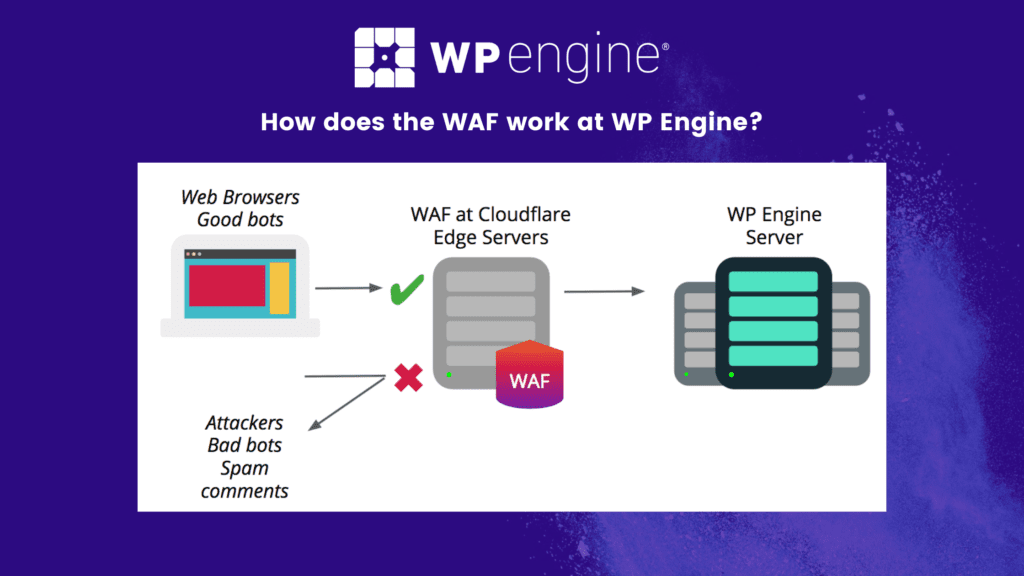
WP Engine automatically handles many security responsibilities, including malware scanning, firewall protection, and update management. Beginners benefit from stronger website protection without manually configuring advanced security systems or monitoring suspicious activity affecting WordPress environments and website performance online regularly.
Performance Optimisation
Caching systems, CDN integration, and server optimisation are included automatically with WP Engine hosting plans. These features improve loading speeds while reducing the need for complicated performance tuning, helping beginners maintain faster websites and better user experiences without advanced technical optimisation knowledge or development skills.
Common Mistakes Users Make With WP Engine
Even premium hosting environments require proper website management and optimisation practices. Many users fail to maximise WP Engine’s benefits because they ignore performance recommendations, install unnecessary plugins, or neglect website maintenance responsibilities affecting long-term hosting stability and website performance online regularly.
Installing Too Many Plugins
Excessive plugins can slow websites and create compatibility problems even on premium hosting environments. Users should focus on lightweight, high-quality plugins while removing unnecessary software that increases server load, reduces performance, or introduces security vulnerabilities affecting WordPress websites negatively over time online.
Ignoring Image Optimisation
Large image files increase loading times and reduce website performance significantly. Many users forget to compress images before uploading content. Optimising media files helps websites load faster while improving user experience, SEO performance, and mobile responsiveness across different devices and browsing environments globally today.
Skipping Website Monitoring
Some users assume managed hosting removes all maintenance responsibilities completely. Website owners should still monitor traffic, uptime, plugin updates, and performance metrics regularly to identify problems early and maintain better website stability, SEO performance, and visitor experiences over long-term growth periods online.
Using Poor Themes
Heavy or poorly coded WordPress themes can reduce website speed and create technical conflicts. Users should select lightweight, optimised themes compatible with modern WordPress standards while avoiding outdated designs negatively affecting website performance, responsiveness, and overall user experience for visitors online today.
Tips to Get Maximum Value From WP Engine
Using WP Engine properly helps website owners maximise hosting performance, security, and scalability benefits. Bloggers, businesses, and agencies following best practices often achieve better website speed, stability, SEO performance, and long-term operational efficiency through managed WordPress hosting environments online today.
Use Lightweight Plugins
Lightweight plugins reduce server load and improve website speed significantly. Users should avoid installing unnecessary tools while focusing on reliable plugins supporting performance, SEO, caching, security, and business functionality without creating conflicts or negatively affecting WordPress hosting environments over long-term website growth periods.
Optimise Website Images
Compressed images improve page speed, mobile responsiveness, and SEO performance. Website owners should optimise images before uploading content while using modern image formats and caching systems supporting faster loading experiences across different devices and internet connections for visitors browsing websites online globally today.
Monitor Website Performance
Regularly reviewing website performance metrics helps identify loading issues, plugin conflicts, and traffic changes early. WP Engine provides tools and dashboards supporting performance monitoring while helping businesses maintain stable website experiences and improve technical optimisation decisions for long-term operational growth online effectively.
Use Staging Before Updates
Testing updates inside staging environments reduces the risk of breaking live websites during plugin changes or design modifications. Users should review functionality carefully before applying updates publicly, helping maintain better website stability and reducing technical problems affecting customer experience or SEO performance online regularly.
Keep WordPress Clean
Removing unused plugins, outdated themes, and unnecessary media files helps maintain cleaner hosting environments. Website maintenance improves performance, security, and operational efficiency while reducing clutter affecting WordPress stability or slowing website loading speeds across different devices and user environments online consistently.
Real-Life Use Cases for WP Engine
WP Engine supports multiple website types across different industries, business models, and traffic levels. The platform’s managed hosting infrastructure helps users maintain stable WordPress environments while improving speed, security, scalability, and long-term website management workflows significantly online.
Affiliate Marketing Websites
Affiliate marketers often rely heavily on SEO traffic and fast-loading content pages. WP Engine helps improve loading speeds, uptime, and website stability while supporting larger traffic volumes generated through search engines, social media campaigns, and product-focused affiliate content online regularly.
WooCommerce Stores
eCommerce websites require stable infrastructure because slow speeds or downtime directly affect revenue and customer trust. WP Engine provides managed WooCommerce hosting environments supporting faster product pages, better scalability, stronger security, and smoother checkout experiences for online stores globally today.
Agency Client Websites
Agencies managing multiple client websites benefit from staging environments, backups, collaboration tools, and scalable hosting infrastructure. WP Engine simplifies workflow management while improving client website performance and reducing technical maintenance workloads associated with traditional hosting environments online consistently over time.
Business Websites
Businesses needing stable WordPress hosting for lead generation, marketing, and customer engagement can use WP Engine for improved security, uptime, and performance optimisation. Faster websites help improve SEO rankings, user experience, and customer trust while reducing operational risks affecting online business growth.
SEO Benefits of WP Engine
Website hosting directly affects SEO performance because loading speed, uptime, security, and mobile responsiveness influence search engine rankings and user engagement metrics significantly. WP Engine includes multiple performance-focused features supporting better SEO outcomes for WordPress websites over long-term growth periods online today.
Faster Loading Speeds
Page speed plays an important role in SEO rankings and user experience. WP Engine improves loading performance through caching systems, CDN integration, and optimised infrastructure designed specifically for WordPress websites requiring faster content delivery and smoother browsing experiences for visitors globally online today.
Better Website Uptime
Frequent downtime can negatively affect SEO performance and user trust. WP Engine’s managed infrastructure helps maintain stable uptime levels while reducing server crashes and performance interruptions commonly affecting lower-quality hosting providers or overloaded shared hosting environments during traffic spikes or technical failures online.
Stronger Mobile Performance
Mobile responsiveness affects both SEO and user engagement significantly. WP Engine’s infrastructure supports responsive WordPress environments and faster mobile loading experiences while improving usability across smartphones, tablets, and desktop devices commonly used for online browsing and customer interactions today.
Improved Security Protection
Website hacks and malware can damage SEO rankings and customer trust quickly. WP Engine includes security systems designed to reduce vulnerabilities, helping websites maintain stable search engine visibility while protecting businesses against technical issues negatively affecting online performance or brand reputation globally today.
Who Should Use WP Engine?
WP Engine works best for users wanting reliable managed WordPress hosting with strong performance, security, scalability, and support features. The platform is especially valuable for growing websites requiring premium infrastructure and reduced technical maintenance responsibilities during long-term business or content expansion online.
Professional Bloggers
Bloggers managing high-traffic content websites benefit from faster loading speeds, automatic backups, stronger security, and better uptime performance. Managed hosting helps bloggers focus more on SEO, affiliate marketing, and audience growth while reducing technical server management responsibilities significantly over time online.
Agencies
Agencies handling multiple client websites benefit from staging environments, developer tools, scalable infrastructure, and workflow management features. WP Engine simplifies maintenance and improves website stability while helping agencies deliver faster and more reliable hosting experiences for clients across different industries globally.
Businesses
Businesses needing reliable lead generation, eCommerce operations, or customer-facing websites benefit from WP Engine’s premium hosting environment. Faster websites, stronger security, and better scalability support business growth while improving customer experience and reducing technical issues affecting online operations regularly.
WooCommerce Stores
Online stores require fast-loading pages, stable uptime, and secure payment environments. WP Engine’s WooCommerce optimisation features help improve shopping experiences, support larger traffic volumes, and maintain stronger website performance during sales campaigns or seasonal demand increases online consistently today.
Who Should Avoid WP Engine?
Although WP Engine offers strong managed hosting features, it may not suit every website owner or budget level. Some users may prefer lower-cost hosting environments or require hosting support outside WordPress-focused ecosystems depending on technical requirements and website goals online.
Small Hobby Blogs
Personal hobby blogs with very low traffic may not require premium hosting infrastructure. Budget shared hosting providers can often handle smaller websites adequately without the higher monthly costs associated with managed WordPress hosting environments or advanced scalability features.
Extremely Tight Budgets
WP Engine pricing is higher than beginner hosting providers. Users working with extremely limited budgets may struggle to justify premium hosting expenses initially, especially if websites are not generating revenue or experiencing meaningful traffic growth yet online regularly.
Non-WordPress Websites
WP Engine focuses entirely on WordPress hosting environments. Users requiring hosting for custom-coded applications, non-WordPress CMS platforms, or specialised infrastructure systems may need broader hosting providers supporting multiple development environments and software technologies online today.
WP Engine Checklist for Beginners
- Choose the right hosting plan
- Configure SSL certificates
- Enable CDN integration
- Install lightweight plugins
- Optimise website images
- Test mobile responsiveness
- Configure backups properly
- Use staging for updates
- Monitor website performance
- Improve WordPress security settings
Final Verdict:
WP Engine remains one of the strongest premium managed WordPress hosting providers available in 2026. The platform combines performance optimisation, advanced security, scalable infrastructure, automatic backups, developer tools, and specialised WordPress support inside one managed hosting ecosystem designed for growing websites and businesses online.
One of WP Engine’s biggest strengths is reliability. Website owners benefit from faster loading speeds, better uptime, improved security, and reduced maintenance responsibilities compared to cheaper shared hosting environments. This makes the platform especially attractive for bloggers, agencies, businesses, affiliate marketers, and WooCommerce store owners managing important online operations.
The biggest downside is pricing. WP Engine costs significantly more than beginner hosting providers, which may feel difficult for hobby bloggers or very small websites with limited budgets. However, users serious about website growth, SEO performance, customer experience, and long-term scalability often consider the investment worthwhile.
For professional WordPress users wanting premium hosting performance without managing technical server infrastructure manually, WP Engine continues to be one of the best managed hosting platforms available today.
Must Read:
FAQs:
Is WP Engine good for beginners?
Yes. WP Engine simplifies many technical hosting tasks through managed workflows, automatic backups, security systems, and performance optimisation tools designed for WordPress users without advanced hosting experience.
Why is WP Engine more expensive?
WP Engine focuses on premium managed WordPress hosting with advanced infrastructure, stronger security, expert support, automatic optimisation, and scalable performance designed for professional websites and growing online businesses.
Does WP Engine improve website speed?
Yes. WP Engine uses caching systems, CDN integration, server optimisation, and managed infrastructure to improve loading speeds, responsiveness, and website performance significantly for WordPress websites online.
Is WP Engine better than shared hosting?
For growing websites, yes. WP Engine generally provides better speed, security, uptime, scalability, and WordPress optimisation compared to traditional low-cost shared hosting environments online today.
Can WP Engine host WooCommerce stores?
Yes. WP Engine supports WooCommerce hosting with performance optimisation, scalable infrastructure, security features, and managed workflows designed for eCommerce websites and online shopping experiences.
Is WP Engine worth it in 2026?
For professional bloggers, agencies, businesses, and high-traffic WordPress websites, WP Engine remains one of the best premium managed hosting providers available for long-term performance and scalability.